
Chartink to TradingView/Screener
ID
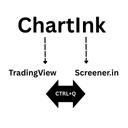
kkpfeaaglkmflaongjnoghihnimdiifbRedirect Chartink stock links to TradingView or Screener. Switch between them instantly with Ctrl+Q.
应用截图
详细介绍
Speed up your stock research workflow. Chartink to TradingView / Screener turns every Chartink stock link into a one-click jump to the platform you actually analyze on — and lets you hop between TradingView and Screener.in for the same stock without ever typing a ticker.
⚡ WHAT IT DOES
• Click any stock on Chartink and it opens straight in your chosen platform — TradingView, Screener.in, or both.
• Land on a Chartink stock page directly? It forwards you to your preferred platform automatically.
• No more copy-pasting tickers or hunting through tabs.
🔁 INSTANT PLATFORM SWITCHING — Ctrl + Q
Looking at a stock on Screener and want the chart? Press Ctrl + Q to open it on TradingView. On a TradingView chart and want the fundamentals? Press Ctrl + Q to jump to Screener.in for the same stock. One shortcut, both directions.
✅ PICK YOUR DESTINATIONS
Open the popup and toggle any combination of:
• TradingView
• Screener.in
• Chartink
Each opens in its own reusable tab, so your browser never piles up with duplicates.
✨ THOUGHTFUL TOUCHES
• Clicked stocks are highlighted on Chartink so you never lose your place.
• Reusable tabs keep things tidy.
• Clean, modern popup — set it once and forget it.
🔒 PRIVACY FIRST
This extension does not collect, store, or transmit any personal data. Your platform preferences are saved locally in your browser only. No tracking, no analytics, no accounts.
⌨️ KEYBOARD SHORTCUT
Ctrl + Q → Switch between TradingView and Screener for the current stock.
🛠️ HOW TO USE
1. Click the extension icon and tick the platform(s) you want.
2. Click any stock link on Chartink — it opens in your selected platform(s).
3. While viewing a stock on TradingView or Screener, press Ctrl + Q to switch.
Built for Indian market traders and investors who live between Chartink, TradingView, and Screener.in.
Have feedback or found a bug? Use the "Report a bug or suggest improvements" link inside the extension popup.
Developed by Alen Sarang Satheesh.